Get MailCrafter for Windows
No subscription, no account: download MailCrafter and it's yours, with every feature, whatever the size of your lists. If it earns its place in your business, a donation keeps it growing.
Free to use. Donations welcome.
MailCrafter is one of the SimuCraft family of apps, and donations are shared across the family. If it earns its place in your business, we suggest $10. Then download below, or just download.

In South Africa? Pay with SnapScan, any amount.

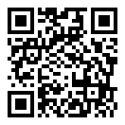
Scan with the SnapScan app or your banking app, or tap the button on your phone.
Windows 10 and 11 · 64-bit · about 120 MB · Released 21 November 2026
Your download is starting
If it doesn't start, click here to download.
Run
MailCrafter-Setup.exe. While MailCrafter is in beta its installer isn't signed yet, so Windows may hold it back:
in your browser choose Keep (in Edge: … › Keep › Keep anyway), and if a blue "Windows protected your PC" box
appears, click More info, then Run anyway.
A Windows PC
Windows 10 or 11, 64-bit, with an internet connection for sending.
An email account to send from
Google Workspace or Gmail, Brevo, Amazon SES, Mailjet, or your mail server's SMTP details. How to connect it
Your mailing lists
An Excel file, a CSV, or rows copied from wherever your customers are kept. Importing a list